Loading...
Project Context
Role
UX Designer
Team
Solo project (OpenClassrooms Project)
Duration
Jan 2023Feb 2023
2 months
2 months
Tools
WhimsicalFigmaMaze
A project from my OpenClassrooms UX design course. I interviewed people who might experience FOMO (fear of missing out) and used the problems I uncovered as the inspiration for an app concept.
Challenge
People with FOMO (Fear Of Missing Out) struggle to discover and participate in events that interest them. They need a way to easily find events, schedule them, and share their experiences with others.
Solution
I designed an event discovery app that allows users to browse events on a future timeline, filter events, schedule them, post memories of participated events, and create groups to share favorite events with members.
Challenge & Solution
Challenge
People with FOMO (Fear Of Missing Out) struggle to discover and participate in events that interest them. They need a way to easily find events, schedule them, and share their experiences with others.
Solution
I designed an event discovery app that allows users to browse events on a future timeline, filter events, schedule them, post memories of participated events, and create groups to share favorite events with members.
Research
Methodology
I conducted user interviews with people who potentially have FOMO to understand their needs and pain points. I created personas, empathy maps, and user journey maps to identify opportunities.
Findings
Key findings include the need for an easy way to discover events, schedule them, and share experiences. Users want to create groups to share favorite events with friends and family.
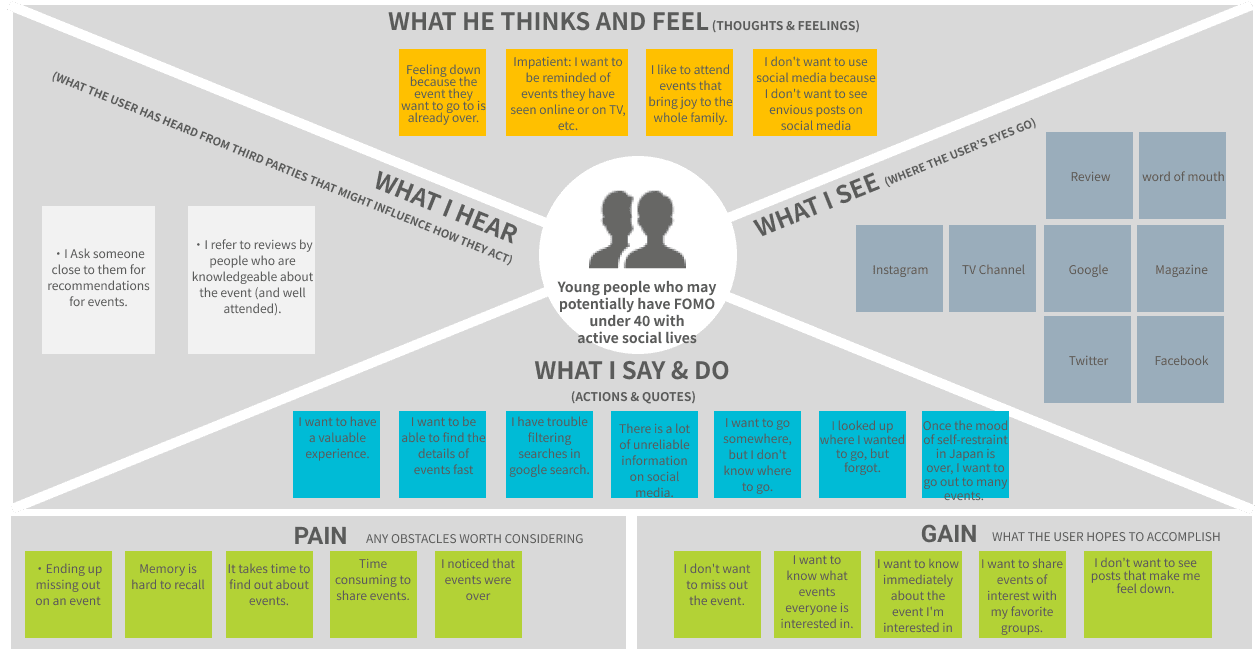
Active Social Professional
28 years old, Marketing Manager / Event Enthusiast
A busy professional under 40 who loves attending events but struggles to keep track of them. They have an active social life and are concerned about missing out on important opportunities.
Click to view details
Persona profile created based on user interviews with people who potentially have FOMO. This persona represents the target audience for the event discovery app.
Says
- •I always feel like I'm missing out on something amazing.
- •I wish there was an easier way to discover events that match my interests.
- •When I see my friends' posts about events I didn't know about, I feel frustrated.
- •I want to share my favorite events with friends and family.
Thinks
- •There must be amazing events happening that I don't know about.
- •I should be more proactive in finding events, but it's so time-consuming.
- •If I miss this event, I might regret it later.
- •I need a better way to organize and remember events I'm interested in.
Feels
- •Anxious about missing out on important opportunities
- •Frustrated when seeing friends' event posts I didn't know about
- •Overwhelmed by the amount of information scattered across different platforms
- •Excited about discovering new events that match my interests
Does
- •Checks social media frequently to find events
- •Searches multiple platforms (Facebook, Instagram, Eventbrite) for events
- •Saves event information in multiple places (calendar, notes, screenshots)
- •Asks friends about events they're attending
Empathy map created to understand user motivations, thoughts, feelings, and behaviors related to attending events and combating FOMO.
1
Awareness
😞Actions: Sees friends' posts about events on social media, feels FOMO
Pain Points
- •Feels left out when seeing events they didn't know about
- •No centralized way to discover events
Opportunities
- •Create a centralized event discovery platform
2
Discovery
😐Actions: Searches multiple platforms (Facebook, Instagram, Eventbrite) for events matching interests
Pain Points
- •Time-consuming to search across multiple platforms
- •Difficult to filter events by interests and preferences
Opportunities
- •Provide intelligent filtering and recommendation system
3
Planning
😐Actions: Saves event information in multiple places (calendar, notes, screenshots), asks friends about events
Pain Points
- •Information scattered across different tools and platforms
- •No easy way to coordinate with friends for group events
Opportunities
- •Integrate event scheduling and group coordination features
4
Participation
😊Actions: Attends the event, enjoys the experience
Pain Points
- •May forget to document the experience
Opportunities
- •Enable easy memory posting and sharing after events
5
Sharing
😊Actions: Wants to share favorite events with friends and family, create groups for future events
Pain Points
- •No easy way to share events with specific groups of people
Opportunities
- •Provide group creation and event sharing features
User journey map illustrating the user's experience from discovering events to participating and sharing memories, identifying pain points and opportunities for improvement.
Competitive Analysis
Comparative analysis of competitors and services
Facebook Events
Social Media Platform
Strengths
- ✓Large user base and network effects
- ✓Integrated with social features
Weaknesses
- ✗Not focused on event discovery
- ✗Privacy concerns
Feature Comparison
| Feature | Score | Category |
|---|---|---|
| Account creation | - | Must-have |
| Social features integration | - | Performance |
Eventbrite
Event Management Platform
Strengths
- ✓Comprehensive event management tools
- ✓Ticketing and payment integration
Weaknesses
- ✗More focused on organizers than attendees
- ✗Less emphasis on social features
Feature Comparison
| Feature | Score | Category |
|---|---|---|
| Event filtering | - | Must-have |
| Ticketing and payment | - | Performance |
| Event management tools | - | Performance |
Meetup
Community Platform
Strengths
- ✓Strong community focus
- ✓Group-based organization
Weaknesses
- ✗Limited to specific communities
- ✗Less intuitive for casual event discovery
Feature Comparison
| Feature | Score | Category |
|---|---|---|
| Event scheduling | - | Must-have |
| Group-based organization | - | Performance |
| Community focus | - | Delight |
Competitive analysis comparing existing event discovery apps, combined with Kano model to identify must-have, performance, and delight features. The findings sorted into basic quality features (account creation, event filtering, scheduling), performance quality (navigation usability, search accuracy, response speed), and delight quality (memory journaling feature, intimate group invitation feature). User testing results showed positive reactions to the fusion of SNS and event management apps, but also identified usability challenges that were addressed in prototype v2.
Design Process
User Flow

Prototypes
Design Evolution
I created low-fidelity prototypes and conducted usability testing with 3 users (colleagues and family) through recorded Zoom calls. Based on the findings, I went through multiple revisions to improve the user experience.

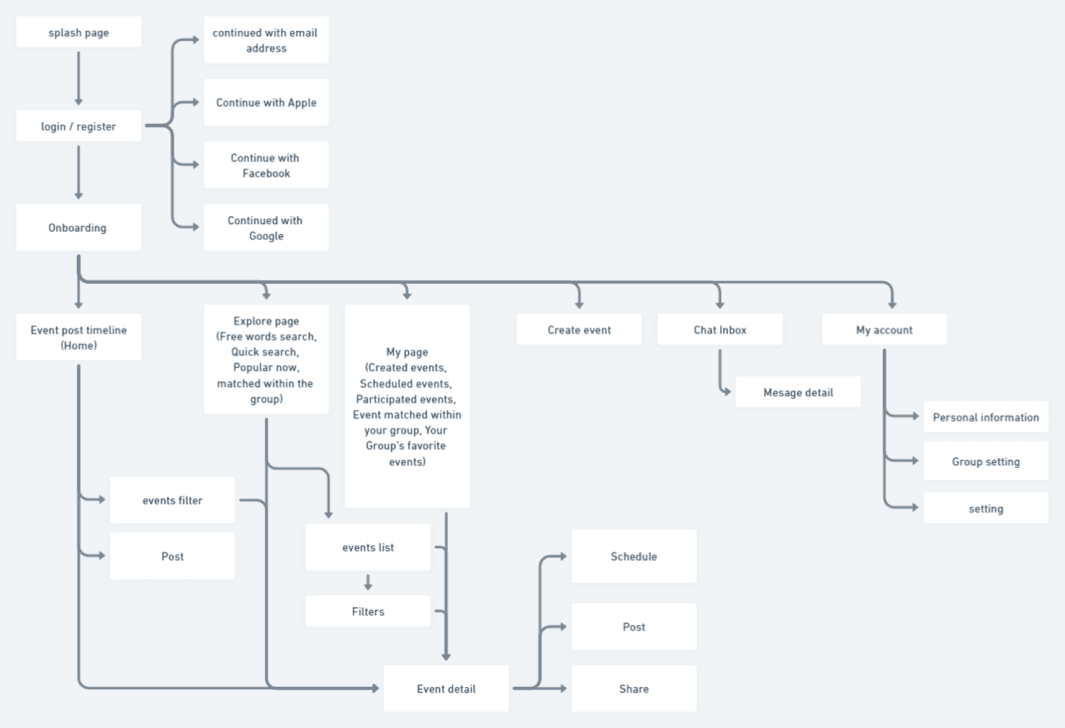
Sitemap showing the information architecture and navigation structure of the event discovery app, including main features like event timeline, filtering, scheduling, memory posting, and group creation.
User flow diagram illustrating key user paths through the app, including account creation, event discovery, scheduling, memory posting, and group creation.

Style guide defining the visual design system for the event discovery app, including typography styles, color palette, and design principles.
Testing & Iteration
Iterations
I ran usability testing with 3 users — colleagues and family — using a script I prepared. Based on the findings, I went through Revision 1 and Revision 2 to address usability issues and improve the user experience.
Improvements
Improvements included better event discovery, easier scheduling, improved group creation, and enhanced memory posting features.